
While not as commonly used as a few years ago, RSS feeds can still be useful. For example, you can convert an RSS feed to an MP3 file to listen to new articles from your favorite websites. Automater on MacOS allows you to transform articles RSS feeds from text to your own audio files or podcasts that you can take with you on your iPhone.
RSS FEEDS TO AUDIO FILES
To transform your favorite RSS feeds into audio files open Automator in OS X 10.5 and add the following steps:
- Get Specified URLS (Add the URL of the RSS Feed you want to convert to an audio File)
- Get Feeds from URLS (This extracts the actual feed from the URL)
- Get Text from Articles (This step pulls out the text from your RSS feeds and saves it to a text file)
- Text to Audio File (Have MacOS read your new text file and save it to an audio file. Be sure to select the voice of the file, I suggest Alex, and where you want to save it)
- Next, Encode to Mpeg Audio to get an Mp3 or M4a audio file you can use on your iPhone.
If you’d like to import the new audio file into iTunes you can add the step: Import Files into iTunes.
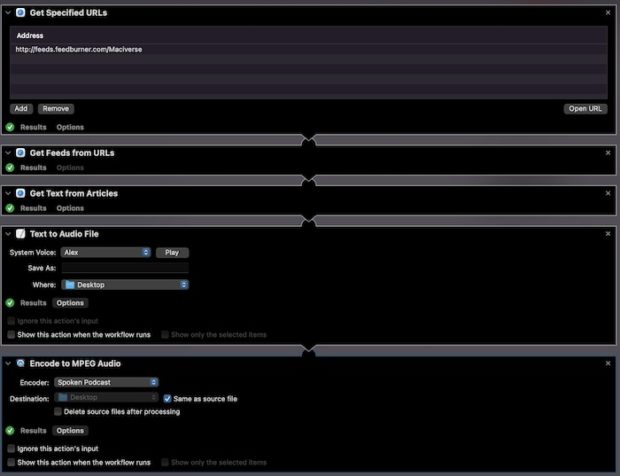
From here you can take your favorite RSS feeds on the go with you. Listen to the articles at your convenience.
Try it out with the maciverse.com RSS Feed.
