Update: You can now find instructions on how to install OS X Snow Leopard from a USB Drive at Maciverse.
If you’re one of those people that continually adjust system settings, make changes in terminal, and try new and experimental software then you’ve probably done something in the past to your OS X installation that has compromised performance or made things stop working completely.
On the other hand, you may have installed the latest updates to OS X and various programs just stopped working. If either of these sound like you, you may find it handy to have a back up OS X 10.5 Leopard install that you can boot to and make adjustments to your system.
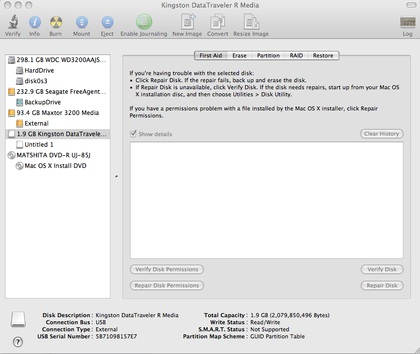
Installing OS X Leopard on a USB Flash Drive is much easier than expected. In fact it is almost the exact same experience you had when installing the device on your Mac originally. For a complete install you’ll need at least an 8gb Flash drive or a larger external USB Hard Drive.
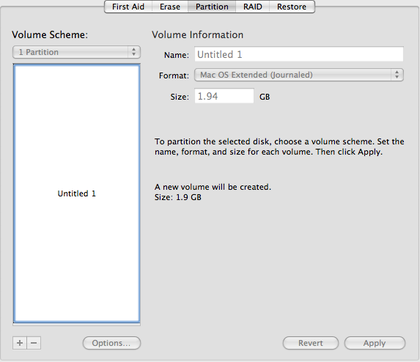
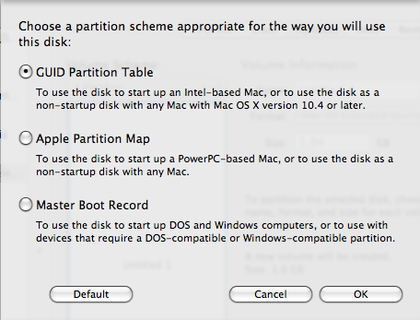
To install OS X Leopard 10.5 follow these steps:


Now that you’ve installed OS X 10.5 on your Flash Drive, it should boot up to the device anytime you select it from System Preference >> Start up Disks.
From my experience running OS X 10.5 on a USB Flash Drive always runs a bit slow at first but performance increases significantly after 10 minutes or so.
If you would like to install a bare bone OS X installation on a device smaller than 8gb see this guide designed for OS X 10.4 but works essentially the same for 10.5
If you’ve enjoyed this article, be sure to subscribe to our RSS feed to discover more ways to optimize your Mac experience.
If you don’t have a large enough USB Drive, the SanDisk Cruzer Micro 16 GB USB 2.0 Flash Drive was what I used and worked perfectly as a Bootable OS X Leopard drive.
126 Responses so far.
popoy
June 20, 2008 at 12:34 amdo you know how make a live cd mac os x ?
Dan
June 20, 2008 at 7:44 ampopoy, I haven’t come across a way to setup a live CD for mac os x. But this essentially provides the same tool capability. You can run OS X and access all of your files on your HD, run applications, etc without impact the other OS installations.
Of course, this has only been tested on Apple Computers. OSX86 builds have not been tested.
Install Mac OS X 10.5 Leopard on your USB | Chronicles of a Techoholic
June 22, 2008 at 1:04 pm[...] I won’t even say anythng, except ENJOY [...]
tinamonte.com » HOWTO: Install and Boot OS X On a Flash Drive
August 9, 2008 at 3:16 am[...] Maciverse » Blog Archive » Install & Boot OS X Leopard from a USB Flash Drive on June 17th, 2008 [...]
Maciverse » Blog Archive » Best of Maciverse August 08
August 20, 2008 at 2:36 pm[...] Install OS X Leopard On a Flash Drive – If you want to have a safety net for times when you’re having hard drive trouble, you may want to have a bootable version of OS X on a Flash Drive. [...]
Luke
September 23, 2008 at 12:47 amHi, Do you know if it is possible to partition a 16gb flash drive, say 2 partitions, one of 10GB and 1 of 4GB (these things are always smaller than they say) and then use the larger partition to install a bootable copy of 10.5?
Dan
September 23, 2008 at 2:11 amLuke, I haven't tried this myself, but I don't see why this wouldn't be possible. Try partitioning the flash drive with Disk Utility and then follow the steps above with the larger partition.
The only issue I see coming up would be the lack of ability to partition the flash drive.
Best of Maciverse: Sept 08
November 7, 2008 at 9:14 pm[...] How to install and boot OS X from USB device [...]
Luis jacquez
December 24, 2008 at 2:52 amI does work for me,I have a 3000 N100 lenovo and 16G cruzer and I install leopard 10.5.2 on my usb and it work the same as it was on my lenovo laptop except much slower I have 3 gig of memory but with the usb OSX on it work like I have 1gig or less memory I just did regular install like you will do on your laptop but boot it from the usb from the bios,always make a back up of your files( yeah your mp3`s and porno) but never be afraid of getting your hands dirty on it,or you will never learn how to do it,have fun!!!
Restoring to a MacBook Air | alexking.org
December 30, 2008 at 12:20 am[...] from USB stick that has SuperDuper on it, with both the USB stick and the backup drive hooked up via USB hub. I [...]
Christmas Holiday Geekery 2008 | ian andrew bell
January 5, 2009 at 3:36 pm[...] a generic bootable USB OSX Leopard installer on a 16GB Thumb Drive – (instructions & instructions) Upgrades and refreshes are now a breeze. It’s also got all of my licensed apps like Adobe [...]
gry planszowe
January 15, 2009 at 3:30 amInteresting article, i have bookmarked your blog for future referrence, thanks
Dan
January 15, 2009 at 10:57 amThanks gry, let us know how we can help.
Tymon
January 16, 2009 at 12:19 amIs this possible to run on a PC? Maybe with a different partition?
Paolo
August 6, 2011 at 9:54 amYou can run mac on a PC, if you have the MAC LEOPARD DVD for Intel or AMD x64. Only you can install it in a external HDD but it doesn't work from USB's
Bye
Dan
January 17, 2009 at 5:22 amI don't think this will work on a PC. If you used a hacitonish install though you may be able to get it to work.
Oleg
January 21, 2009 at 4:11 pmInstallation OSX DVD has 10.5.2 version and we have 10.5.6. Is it possible to update OSX installed onto USB Drive and install additional such software as TechTool Pro, Drive Genius etc? In that case we'll be able to use this USB for main disk repair.
Dan
January 22, 2009 at 11:12 amOleg – If you install OSX to the USB Flash drive and boot from it, you can upgrade to 10.5.6 just like you would a normal HD. I'm not sure how to slipstream the install files before installing OSX.
mm
January 28, 2009 at 10:28 pmmac os download
David
February 3, 2009 at 2:33 pmHi – This hasn't worked for me. I'm installing OS X Leopard onto a 16G Kingston DataTraveler. I have tried this several times and it boots my wife's MacBook Core Duo like a champ. But it will not boot my newer Core 2 Duo. It shows up in Startup Disk, but when I restart it eventually bypasses the USB drive and boots from the internal drive. I even cloned (with SuperDuper) a bootable Tiger partition on an external hard drive onto the USB drive, but same results. GUID is chosen. I've reformatted and even zeroed out the data on the flash drive, but same results. Thoughts? Thanks.
Chadron
February 9, 2009 at 10:29 amHello I am running Leopard 10.5.6 on a USB flashdrive, on my PC it works great! I am wondering is there a way to install any software to use with it. Any input is priceless!!
rotchopf@gmail
thanks
Dan
February 9, 2009 at 10:45 amChadron – You should be able to install and run any software on it as long as the drive you installed it to has enough free space.
vlady
February 11, 2009 at 8:00 pmHi all!
@Chadron – Can you give some more info/detail of how you managed to create a bootable USB flashdrive?
I'm stick with this…
Thanks!
Eric
February 24, 2009 at 2:36 pmI've got the exact same problem! I've followed all the steps to a T, but this MacBook Pro refuses to boot from the disk I've setup…
Dan
February 24, 2009 at 3:27 pmeric – have you tried selecting it as a startup disk by holding down option during boot? Are you using one of the new form factor Macbook Pros? I haven't tried this on the newer models and it may have limitations on how it supplies power to USB ports.
Jared
March 3, 2009 at 5:01 amany specific benchmarks (or general idea) of how much slower a mac pro, for instance, would run if for some reason you only ever ran it from a usb drive as opposed to from the HDD? thanks for all your help!
Dan
March 3, 2009 at 10:58 amI don't have any benchmarks but from my experience it will be significantly slower. The speed is still usable but it won't function as quickly as a standard HDD.
alex
March 21, 2009 at 7:02 pmWorked from a dmg file, disc image.
I Partitioned a Ruid the drive, and used Disc Utility and Restored the drive from the dmg file.
Thanks Dan…
Zane
March 30, 2009 at 6:14 amHi i am trying this but my usb is not showing up in disk utilities. any help?
Dan
March 30, 2009 at 8:00 amZane, does the USB show mounted on your desktop? Have you tried with a different USB drive?
Matthew
April 25, 2009 at 12:22 amI have the exact same problem, for some reason it won't boot from the usb, only from the internal HD, despite me choosing to start from the USB start disc.
Dan
April 25, 2009 at 3:53 amMatthew – Are you using one of the new form factor Macbook Pros? I haven’t tried this on the newer models and it may have limitations on how it supplies power to USB ports.
joeyslaptop
May 2, 2009 at 11:31 amMy installed OS X.5 on my hard drive (installed from retail disk) doesn't contain the required receipts (still boots fine I guess), so I have no way to copy them to the pen drive. Any ideas?
Dan
May 2, 2009 at 9:57 pmJoeyslaptop – Not sure exactly what you're having trouble with. When does it prompt for the receipts, what are you trying to do, and what exactly is the hangup?
joeyslaptop
May 3, 2009 at 7:30 pmDan -
Thanks for the response. It turns out that the issue was with blessing, not with receipts. I also guess I must have been reading multiple pages at once late at night and accidentally posted here thinking that this was one of the pages explaining a manual installation of each package needed for the OS to fit on a small USB drive.
I was using a hackintosh and trying various USB-drive methods for manually installing just to another internal hard drive. In another USB-drive method I found online, the guy got his installation down to about 2 GB. It involved using pacifist, moving and installing packages individually, eliminating unwanted files, copying the receipts from a working Leopard installation on your hard drive, and then blessing the core services folder.
To answer Tymon's question, yes, you can install OSX onto a USB drive that will work on a PC, but it's verrryyy involved, and can end up really buggy (drivers, boot loader issues, etc). It's also guaranteed to not work on many different models of PCs due to driver issues, motherboard configurations, CPUs, etc. Blegh.
Just stick with a Mac if you like OS X – even if you don't think you can quite afford one. It's a way better option than learning how to create a PC Hackintosh. The honest truth is that DELL and other PC companies charge you a few hundred up front, but provide horrible customer service and cheap parts. With a Mac, you pay a little bit more upfront, but get solid hardware and service reps that don't try to sell you parts to replace the broken ones that are still under warranty. In the long run, you pay the same, but get little or no hassle at all from Apple while Compaq, etc don't mention the long-run costs associated with their products.
Thanks again. Also, I like your method for installing OSX to a USB thumb drive: it's straight forward and simple enough for novice-advanced users.
Dan
May 5, 2009 at 9:19 amThanks joeyslaptop for your help and comment!
Petr
May 18, 2009 at 8:22 pmHi,
I tried to do as described but installation always failed once the part where data are being copied to USB stick was reached. It end up with yellow triangle and error message, something like it can't write data to USB. Tried on different platforms (Dell D620, HP nx61x, Asus eee 9x ..) can't find anywhere what's the cause of this.
any help appreciated.
P.
Dan
May 18, 2009 at 9:24 pmPetr – I've only successfully done this on a Mac. Have you tried this on a Mac? Different USB drive?
shashi
May 26, 2009 at 8:23 amif u r using vista or windows 7 then,
open command prompt with admin rights,
at the prompt type DISKPART
then LIST DISK, now look up for your 16gb flash drive/pen drive(say disk1 for example)
type SELECT DISK 1
CLEAN
FORMAT FS=NTFS QUICK
CREATE PARTITION PRIMARY SIZE=N
NOTE: n =8gb n it shud be montioned in bytes
CREATE PARTITION EXTENDED SIZE=N
NOTE: n =8gb n it shud be montioned in bytes
ACTIVE
ASSIGN
EXIT
thatz it now your pendrive has two partitions of 8gb each
BlackMacX
June 25, 2009 at 2:52 amThis idea is interesting; the one issue with running from a USB Key is the burn out due to the swap file being located on the same drive; has anyone tried to relocate it so that it resides on a RAM disk that is automounted as part of the OS startup?
As to those users who can't boot their newer Macs with the older Leopard DVD, the reason is you're likely using a version of the OS that is not viable with the newer Mac. So you either will have to use the newer Mac's Leopard DVD or bring the version of Leopard on the USB Key up to the same level as the new one needs (I would suggest 10.5.6 being your minimum).
Great article by the way, I used to have an emergency bootCD for OS X under Puma and Panther; but this is just as handy and I need it for recovery and diagnostic purposes for my Macs.
Tony
August 3, 2009 at 9:36 amThis is a reply to David about the Kingston DataTraveler 16GB. I have the same issue. I also have the 16GB and it shows up on Startup Disk, I click to restart it, and it will not start. It also does not show when pressing Alt at the startup. I also confirmed that the installation worked fine as I cloned the flash drive into an external HDD and it booted fine from the external hard drive.
Also, in Disk Utility, I have not been able to change the "Volume format" from MS-DOS (FAT) to MAC OS Extended on the Master Root of the flash driver, and not sure if that has something to do with the issue. I am able to format the partition in MAC OS extended and that is how it was originally installed.
Any help on this would be appreciated.
Waffle » Blog Archive » Mac things I’ve found useful lately
August 8, 2009 at 1:18 am[...] Mac Boot Key combos Install & Boot OS X Leopard from a USB Flash Drive. [...]
Install OS X Snow Leopard from a USB flash drive
August 29, 2009 at 12:38 pm[...] on your flash drive, you may need to follow steps 5 – 7 on on installing onto a USB drive to make sure the drive is bootable before you get [...]
Kevin
September 2, 2009 at 4:24 amHow do I Upgrade? I have the image (7.1gb) on my external USB drive. I can boot from it but when i double click on the install it starts with 46min to install and I don't see an "Upgrade" Option listed. I dont want to do a clean install. If I don't boot from the USB drive but instead try to double click the install package i get a message "install cant be used from this volume". Is it possible to do an Upgrade and not a clean install?
Dan
September 2, 2009 at 11:30 amkevin – are you upgrading to Snow Leopard? If so, booting for the install will automatically upgrade unless you erase the target drive with disk utility before the install.
Installing Snow Leopard onto an External Hard Drive
September 5, 2009 at 7:34 am[...] steps to install Snow Leopard onto an external hard drive are very similar to the steps of booting OS X from a USB drive. In fact, if you have a large enough USB flash drive, you can use these same steps to install Snow [...]
maak een Apple Tablet van je netbook
September 8, 2009 at 11:01 pm[...] volgorde kan je in het BIOS menu wijzigen. Een 8GB USB stick of externe harde schijf kan je zo formatteren dat je netbook er mee kan opstarten waarna je OSX kan [...]
Dan
September 9, 2009 at 9:02 pmTry the process again. Others have reported that a dmg download of snow leopard is not working for this type of installation.
Try imaging from a retail DVD.
bennyp
September 10, 2009 at 3:58 amHeyo,
I have an 8g sandisk cruzer. I used the sandisk utilities to remove the U3 partition, then I partitioned the drive with a GUID table, then I restored from a dmg image of Snow Leopard. I mounted the cruzer, then restarted with option, the disk appeared in the menu and i selected it. The drive’s orange activity light blinked to indicate read/write activity for a few seconds, then went totally dark, and the screen stayed totally grey (no spinning wheel, no apple logo).
Any advice??
rc
September 12, 2009 at 7:45 amHi Dan, I've a whole list of things to ask, I'll try to cut it short:
I just bought a Gigabyte T1028M Touchnote netbook (that's similar to the Gigabyte M912, yes they're both tablet touchscreens!) and I came across so many articles, including one that featured the M912 as well, that I might be able to install Mac OS on my T1028M?
What I have:
- My Macbook with a DVD ROM and CD-RW feature on it
- Mac OS 10.5 Installer that came with it
- Gigabyte T1028M with no optical drive
- Some Chameleon thingy that I obtained somewhere that said that I have to put it in a flash drive to allow me to boot up and and install mac OS into the netbook.
What I want to (and hope that I can) do:
1) Retrieve the hidden partition of the netbook and create an "Installation USB Flash Drive" so as to create a backup copy of the restoration data that came with the netbook in the first place (and free up some space too of course)
2) Since I do not have an optical drive on my netbook, I wish to clone the whole Mac Installation CD into a USB Flash Drive as well. (p.s: NOT retail version, it's the one that came with my Macbook)
3) After which, Combining the whole process, I hope to install Mac OS onto my netbook.
Could you please tell me what's my likelihood of success and what problems will I face?
Thank you sooooo much!
Volker
September 18, 2009 at 1:42 pm21 Minute Install!
Start: 11:17pm EST, Ends 11:38pm EST
Specs:
1st Generation 13 inch white Macbook
2 GB DDR2 667
320 WD 7200 RPM HD
Sandisk 8GB Flash Drive.
Volker
September 22, 2009 at 6:45 amSorry to break this to you, but the subject at hand is not about installing OSX Snow Leopard on a hackintosh (Non Mac Hardware)… If you need material or resources for that please direct your browser to the most useful tool on the interwebs… G O O G L E . C O M. Just a word of advice… If you have no idea what you're talking about (pertaining to OSX on non-Mac Hardware), i'd suggest you give up now, and fork over the necessary portion of your salary to buy a Mac.
Also worth noting, you need a FULL copy of OSX Leopard/Snow Leopard to perform any of the steps outlined above (if that is the case). Not the CD that came with your hardware. That is "not" a full copy of OSX.
Carlos
September 23, 2009 at 12:42 amI have followed this threat exactly how its detailed, and have notice how active and helpful you all are on the message board… and typically try and fix myself, but can't figure it out…
Here it is:
I have 10.5.6 dmg file on a large external HD, and want to install from a 8gb flash drive.
Trying this on macbook pro (last years model) and wife's white macbook.
What I've tried:
I boot up into EFI window( i think thats what its called) and through disk utilities, select my 8gb to be a GUID partition, then proceed to restore.
source: 1TB external USB HD – also used as my time machine backup
restore: 8gb flash drive
Restores goes as planned… i've tried deleting and restoring like 6 times.
I select flash drive from Utilities – > start up and select 8gb bootable flash drive ->restart. press option during startup-> make sure I select correct drive. I select my 8gb flash drive and proceeds to bootup, but never goes past grey window with apple logo and little circle loading icon(i've waited 10-15 minutes to see if it gets past that window, but never does). It happens on my macbook pro and macbook, so I know i'm doing something wrong.
Just an added note, I initially wanted to install from my time machine external HD… went to disk utilities and specified the 10.5.6.dmg file as source and same HD as restore location. Everything seems to work. I have the install file in my root directory. When I restart and select external HD, boots up into Welcome installation window -> Agreement -> select where i wanna install window. Right as it starts to install, I get a yellow triangle. Mac OS X could not be installed on your computer. The installer could not locatre the data it needed to install the software. Check your install….. hope i've covered it all.
rc
September 25, 2009 at 3:15 pmyawn. already got a mac, troll.
i'm just exploring, elitist-wannabe, go shower your insults elsewhere
Install OS X Snow Leopard from a USB flash drive « BeginnerPC : Tips , Tricks & Tutorials
September 26, 2009 at 8:26 am[...] on your flash drive, you may need to follow steps 5 – 7 on on installing onto a USB drive to make sure the drive is bootable before you get [...]
Marino
October 1, 2009 at 1:31 amHi,
this tutorial is very interesting. I want to install a system for rescue. A small system with all software working on it, which i use and need for study. In the case that my normal System wont work when i really need it…
Is it only possible to install on USB-Drives and Sticks? Or can I use the SD-Slot for it? I'd no luck with USB-Sticks. SDHC probably is the best way for me, when it works?
Anybody tested it or is it impossible for the MAC boot up on SD?
Marino
Volker
October 5, 2009 at 4:15 amThose were insults? Sorry i made you QQ. If you had half the brain cell in your head, then you'd know how to use a search engine. That's not elitist, that's common sense. You'd also have the "common sense" (there are those two words again) to not ask about performing "illegal" (yes illegal, cause you're infringing copyright) installations on "NON-MAC hardware". Ever heard of Psystar? (use that tool i gave you, Google). By the way you sound like one of those "special" account manager type of individuals who expect their HD to fix everything… If i'm a troll sir, you're one useless Tool. Welcome to the information age dumbass.
Oktopuz
May 11, 2011 at 12:54 amHey Volker Troll, how about you stfu? Google brings you to this article when searching for this specific subject. And there is very little information about this matter at all. There might be several pages, but it's all the same. Some people will be looking for specific answers and being able to post here was made to actually be able to share your questions. I cant find a single bit of usefulness in any of your threads, which just talks for itself. Stop breathing our air., it's just not worth it.
jay
October 11, 2009 at 11:01 amwill this method work with windows based computers ex. compaq
Adam
October 19, 2009 at 5:51 amwhen i partition it can as a master boot record to boot on my windows computers. how could i make it work on intel macs and windows systems
Adam
joe
October 20, 2009 at 6:23 amOk. So I have a 32 gig usb flash drive and i am trying to create a boot drive and it doesnt work. i boot from the dvd and it says the flash drive can not have os installed on it????? i have tried the restore methosd. no luck… I have reformatted flash drive. I am outta ideas, any help…oh this is on a ppc with a 32 gig flash drive from integral. dvd os 10.5 is a retail version….????
Dan
October 20, 2009 at 12:24 pmnot sure exactly how this works with the ppc. But be sure you've set the GUID partition correctly.
sany
October 21, 2009 at 12:05 amhow to burn dmg file to 2 dvd ?i want to install mac os to non apple laptop..it can be done or no ?!or i should be convert it to iso file fisrt before burning?
thanks
DavidGR
October 25, 2009 at 2:04 amhow can i install leopard from a usb, i have a acer aspire one and i have windows 7, and i dont have a mac, i want to install leopard in my acer aspire one without a Dvd, i have only an acer aspir one, windows 7, and a 16Gb Usb
Dan
October 25, 2009 at 11:09 pmHey, This is for installing on a Mac. I'm not sure of the process needed to prep a PC for OS X installation via USB.
Ian
November 2, 2009 at 2:19 pmHi. I downloaded the torrent for Mac OS X Snow Leopard and I formated my 160gb external hard drive but I cant figure out how to get my copy of snow leopard to install on my computer any help would be great. I am currently running Mac OS X Tiger 10.4.11 on an intel iMac.
Dan
November 3, 2009 at 3:21 amI haven't done this with the torrent download so I'm not sure what the problem is. Most people that have had issues have had them with a torrent DL.
Ian
November 3, 2009 at 7:27 amNo the torrent file is just snow leopard dvd that you can mount and then it appears as if it is the install disk accept it looks like a drive.
Burn bootable OS-X Leopard DMG image to USB - Mac-Forums.com
November 6, 2009 at 6:12 pm[...] Install & Boot OS X Leopard from a USB Flash Drive __________________ June 2007 July 2009 [...]
Broken Macbook Pro | kerstins kleiner blog
November 12, 2009 at 5:11 am[...] how to install os X from a usb flash drive summarizes the steps how to format the usb device [...]
Ian
November 18, 2009 at 2:45 pmThank you so much. When I try this I will let you know how it went.
Karl
December 1, 2009 at 10:04 amHow about using a USB memory stick to back up mac osx from your computers hard drive,just like you would for pictures or applications,is this possible?
Many thanks.
Karl.
Dan
December 2, 2009 at 1:50 amYou can use time machine to backup OS X to an external drive. USB flash drives can be utilized, but they'll need to be big enough to hold on the data (very few are large enough).
IOUSB Problem! - Hackint0sh
January 28, 2010 at 8:21 am[...] I had an USB Drive SanDisk with 16GB. Next step, how to install Leopard on USB Drive? I used this tutorial. The only thing that it didn't say was that you have to go through a customize installation. Do it [...]
Connect two laptops without firewire? - MacTalk Forums
February 2, 2010 at 5:02 pm[...] seem to recall there was a method to boot via USB 2.0, but I can't recall it now." Install & Boot OS X Leopard from a USB Flash Drive | Mac Help from Maciverse "It has firewire but my macbook doesnt" And that is also one of the reasons that [...]
Aggi
February 21, 2010 at 10:08 pmI've tried this method on my usb sata 500gb HD.. and it is not booting.. in few sec it goes back to dual boot loader.. is there any other way to boot ?.
asdf1337
March 14, 2010 at 7:48 pmif u all can read, you will notice that disk utility has both options on partitioning HD's, GUID for intel based Macs (if u have an intel mac, u have to format your usb stick in GUID), if you have a PowerPC (G3,G4,G5), you have Apple Partition Map, that does make your usb stick bootable under PPC macs…
i haven't tried none of the above yet, i'll see if i can find my 8gb usb stick…
What’s on your flash drive? | php|architect
March 26, 2010 at 10:09 am[...] I mentioned earlier, one of my fellow bloggers mentioned having OS X on a flash drive. It’s a fairly straightforward process to get Leopard on a flash drive, but know that you’ll need one with a lot of space—at least [...]
Mac OS X Installation von USB-Stick « Das nie endende Chaos!
April 10, 2010 at 11:25 am[...] Der Vorgang dauert ca. 20Min und danach lässt sich MacOS X direkt vom USB-Stick einrichten. Hier ein Artikel der den Vorgang genauer beschreibt: http://www.maciverse.com/install-boot-os-x-leopard-from-a-usb-flash-drive.html [...]
simplificator » Blog Archive » Ejecting a disc form an iMac when everything else fails
April 30, 2010 at 12:29 am[...] The solution i came up with was to create a bootable USB drive with the correct version of the OS X install disc. Here is how you do it. [...]
Benny
May 7, 2010 at 5:08 pmTHANK YOU! This worked great. In fact, I partitioned an 80GB USB hard drive, and used the same .dmg/guid trick to create bootable disc images of my original macbook restore DVD which was 2 discs AND my leopard DVD ALL on my USB drive. So what I did was took the USB drive and partitioned it to be 4 guid drives, broken down as 8GB, 7GB, 6GB and the remainder for the rest of the drive. I imaged the installed DVDs into each partition using the restore feature(I got info on each DVD to see how big it was first) and bam! Done. Actually, it took a long time, but I kept busy in between chasing my kids around the house.
So now.. when I want to restore my system, I just boot up to my USB drive and I've got all of my DVDs copied as images on said drive… so I just install away.
MANY THANKS!
Dan
May 7, 2010 at 9:22 pmBenny, Nice solution! Glad it worked for you.
diley
May 8, 2010 at 6:18 amIt workd on my Imac G3, but it doesnt work on my imac g5 since it wont boot from usb.Any way to solve this???
在F31上打造一台黑苹果 | 于仁颇黎@机器人
May 22, 2010 at 8:16 pm[...] 打造USB MAC 启动安装盘:http://www.maciverse.com/install-boot-os-x-leopard-from-a-usb-flash-drive.html [...]
Razi
June 4, 2010 at 6:39 pmDan did not mention if the OS X Install DVD to be "restored" has to be a retail copy or it can be the restore DVD no.1. Elias says it must be a retail copy or a rip…
I tried to do this using my OS X Restore DVD 1. Since the first step, the Mac OS X Install DVD would not be recognized as a source (no plus "+" sign). I created a compressed image of the OS X Install disc that could be dragged onto the source field, hit restore and got the message "Could not find any scan information. The source image needs to be imagescanned before it can be restored."
Any ideas ?
Name
November 22, 2010 at 2:29 ammount the image and drag the virtual disc shiz from the left to the source and the usb as the destination..
Germican
May 11, 2011 at 12:58 amTo get past the "no scan information", open Disk utility and go to images–> scan Image
And done ^^
Boldwick
July 15, 2010 at 11:06 pmHey, I have MacBook Pro with 320 NV GP, I have done all the instruction but unfortunate it does not works,
I tray my best to boot from Snow leopard CD, USB HD & Flash but always the Dump Language message it appear, also I downloaded 10.5 X but it never boot.
I really don't know what's going on.
Dan
July 16, 2010 at 4:30 amare you using a retail DVD or an image you downloaded from the internet? Images from the internet have often not worked with this process.
itguy51
July 29, 2010 at 12:47 amWhy doesn't the install disk show up in Disk Utility? It's in the disk drive just fine. Any Ideas?
Mac Day 2 » 花栗鼠柑仔店
August 1, 2010 at 5:33 am[...] 終於搞定用USB硬碟安裝Mac OS X, 原本想說10.4勉強用, 不過後來真的10.4用起來綁手綁腳, 且有很多軟體限定要10.5以後才能用, 受不了想來試試看網路上所說的用USB硬碟安裝10.6 Install & Boot OS X Leopard from a USB Flash Drive | Mac Help from Maciverse [...]
loonatic
August 8, 2010 at 7:14 pmThis works for me on a PowerPC (PPC) iMac G5:
source: http://mediacaster.nl/usb_boot_imac_powerpc_g5.ht…
1. Be sure to partition the disk with an Apple Partition Map (i.e. not GUID or MBR)
2. Determine the partition where your bootable image it situated (e.g. an MacOSX DVD or DMG restored to a partion with Disk utility's restore). This might be disk1s3 in which case the partition number is 3
3. Restart your iMac while holding down Command-Option-O-F (Alt-Cmd-O-F). This will land you in Open Firmware.
4. Type:
dev / ls
to get the device tree/list.
Look for something in the output like:
/usb@b
/disk@1
As we're talking about a tree here, write down the complete path to this node. In my case it would be:
/ht/pci@2/usb@b/disk@1
5. Type:
devalias ud /ht/pci@2/usb@b/disk@1
In other words: make 'ud' equal to the path you found in step 4.
6. Now verify you got the right disk:
dir ud:3,
(3 is the partition number you wrote down in step 2)
And look for a file with tbxi attribute, probably in:
SystemLibraryCoreServicesBootX, e.g.:
dir ud:3,SystemLibraryCoreServices
7. Then boot from it:
boot ud:3,SystemLibraryCoreServicesBootX
8. Presto !
USB's your uncle.
Anarch
August 14, 2010 at 7:19 amI just wanted to help everyone else out who's on the google search for how to make a snow leopard bootable usb install WITH WINDOWS(Not OS X like the first 20 pages of the search explain…).
You need a program called "TransMac", you'll also need an 8GB Flash drive (with nothing on it). I used MagicISO(trial won't do it… sorry) to expand my dmg to it's full size which adds another gig to total size. Next I used TransMac to "Format for Mac use" and formated to HFS+. Then I used the option to "Use disk image to format". Takes a while… fills ur drive to the near 7.50 gigs.
I don't use any form of a Hackintosh but with the massive failure of the 2009 superdrive….. There are many legitimate needs for this of which is very under-documented.
Stephan Joldzic
September 19, 2010 at 9:49 pmhey Volker, maybe you could quit stuffing **** into your own butthole long enough to realize that there was never any mention of OSx86, he said this is for a regular Mac. If you're so interested, why don't you direct your OWN browser to Google.com and make your OWN tutorial on how to put OSx86 on a Flash Drive. Stupid troll.
irfan
September 27, 2010 at 7:42 pmplz some one tell me how to install mac os x loapard on dell xps m1330 when i start setup after loading it give me msg you need to restart your pc with saveral languages
tiger
October 11, 2010 at 5:53 amstep 7 seems to assume the user wants to install Leopard on an Intel machine. i want to install it on a G4 PowerBook, and while i've partitioned my 8 GB flash drive with Apple Partition Map so it will boot a PowerPC machine, the Leopard installer isn't letting me select the flash drive as an install destination. it says, "You cannot install Mac OS X on this volume. Mac OS X cannot start up from this volume."
what's the problem?
thank you.
Dan
October 11, 2010 at 6:19 amTiger – I don't believe that the G4 Macs can boot from USB. Just FireWire.
festfan
October 28, 2010 at 7:50 pmJust wanted to say in regards to poster #38, loonatic, that your technique worked flawlessly. Used a .dmg of Leopard and restored it to my 8GB USB flash drive, then booted into open firmware on my iMac G5 17", followed your instructions and had no trouble doing the install. Thank you! You just ended a month of frustration trying to get this thing to work.
Lobomute
November 30, 2010 at 1:52 amJust came across this and it sounds like it *might* help me.
Can't boot my mbp core duo from the internal partition containing OSX, but itll boot to a windows partition I setup through bootcamp. (think it may have been the victim of a small static charge?)
The windows partition doesn't recognize the OSX partition, and when I boot to an OSX cd, it sees the OSX drive as unformatted/unpartitioned.
Would an OSX thumb drive install be able to access the data on my seemingly corrupt partition?
Yes, no, maybe?
I'm trying to recover the last 6 years of my life before I reformat, so if you have any other recommendations, I'm all ears.
Dan Hinckley
November 30, 2010 at 2:06 amIt would be the same as booting from the OS X CD.
brittany
December 6, 2010 at 4:49 pmcan anybody download the disc and send it to me im in desperate need of it…
Julian
December 25, 2010 at 2:50 pmHi, is it possible to install and boot up os x snow from the USB only, without any cd? Because my cd rom is ruined?
josmac1
January 4, 2011 at 8:35 amMade a mistake by completely booting my ext drive as install drive (DVD). In stead of making first a partition.
Now unable to see drive in finder and disk utility.
Could somebody help me out making my disk re-visible and be able to re-use it?
Thanks, cause its a great way for more similar issues.
fedya
March 3, 2011 at 3:19 amI cannot make a bootable usb from internet guides. I need to buy special programm – ProteMac LogonKey. Works nice and no problem! http://www.protemac.com/logonkey/
tea chest
March 27, 2011 at 12:04 amI would love to find out more can you point me in the right direction to find more information?
ben
May 3, 2011 at 9:39 pmHi there !
I hv an imac G5, but i’ve read some article from internet that said an imac g5 can’t using mac os x snow leopard. That’s true?
Please reply to my email. Thx.
Germican
May 11, 2011 at 1:04 amSo I used a 10.5.dmg that I used to burn to a DVD to install the OS. It's on the External HD and it shows at option-reboot. Problem is, once I click it, it just freezes. I've re-restored it like 10 times by now imo. Any ideas?
Alessandro de Araújo
June 20, 2011 at 2:16 pmWhat if I insert the OS X Tiger DVD (the one I have) into my Mac? Would it work?
Dziwny problem z instalacja OSX Pomocy!
September 21, 2011 at 4:19 am[...] Mogę jeszcze polecić spróbowanie takiego myku: Install & Boot OS X Leopard from a USB Flash Drive | Maciverse , skoro instalacja z napędu optycznego sprawia kłopoty… Mac Mini 2010 Snow Leo iPhone [...]
PowerBook G4 problem z dyskiem i/lub pamięcią
September 28, 2011 at 1:43 am[...] No tak zapomniałem: Install & Boot OS X Leopard from a USB Flash Drive | Maciverse Komputer: PB/G4/15" Telefon: no kia Cytuj + [...]
Leave a Reply
Get The Latest From Maciverse
Advertisement
Popular Articles
Apple Topics
Recent Posts
Copyright © 2012 Maciverse.com. All rights reserved.
Site powered by Go Fish Digital