
We’ve recently described how to add your Facebook phonebook to Address Book as well as the steps needed to sync Address Book with your Google Accounts.
To continue with efforts to make your Address Book as comprehensive as possible, you may want to include all your LinkedIn.com business contacts.
Add LinkedIn Contacts to Address Book
To add your LinkedIn Contacts to Address Book:
- Navigate to LinkedIn.com and login to the site
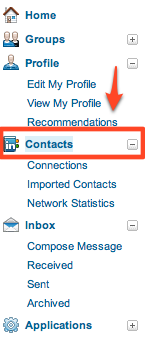
- After Logging in, select Connections on the navigation bar
- At the bottom of the connections page select Export Connections
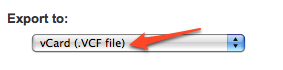
- Select vCard(.VCF file) from the Export Drop down, enter in the contents of the security image and then click Export.
- After the .VCF file downloads, open it with Address Book and confirm the details of the contents you’re importing. Merge the files that should be merged and allow new entries to be added for those you don’t already have.

Adding LinkedIn.com contacts to Address Book will make you more and more likely to utilize the application in your every day activities. The more relevant the data it houses the more important it will be to you. Gather as much information about the people you want to keep in contact with and let Address Book keep that information organized for you.
