
iWeb has allowed individuals to quickly create all kinds of websites. But unfortunately the ability to add forms to these websites is not an included feature.
Luckily, with a bit of help from two free web services, forms can be added to help gather information from individuals visiting your website.
Create the Forms For iWeb
To be able to add forms to your iWeb pages you first need to create them. Google Docs recently added the ability to create forms and have the data collected stored in their spreadsheet application.
To create a form on Google Docs:
- Login to docs.google.com
- Open a New Spreadsheet
- Click the Share tab
- Check ‘To Fill Out a Form’ and then Start Editing your Form
- Create your form and click Save
- Return to your Spreadsheet’s Edit tab and click the link to Go To Live Form. Copy the URL of the Live Form
Now that we’ve created the form we’ll want to put the form into a format that will fit nicely into our iWeb pages. A new web application, Sprout, will help us do just that.

To have Sprout help us setup our forms in a format perfect for our iWeb site:
- Navigate to Sprout and Get Started with a Blank Slate
- Add a title for your Form and enter the size you’d like your Form to be on your iWeb page
- Now that your blank slate is loaded and ready, select Services (under Components on the right) and then Google Forms
- Instructions on how to add your Google Form to your Sprout will be displayed on your Blank Slate - Paste the URL into the Form URL field on the Right
- After you’ve pasted the url, hit return and you should see your form on your slate.
- Now we need to Publish your Slate.. Click Publish in the top Right (You may need to create an account with Sprout - Don’t worry its free)
- Once your Sprout has been published, copy the code in the box to the right.
Adding the Form to iWeb
Now that we’ve created and formated the Form we need to add it to the iWeb page we’d like it to appear on. To do this, open up iWeb and click Web Widgets and select HTML snippet. Past the code from Sprout into the HTML snippet box and hit enter.

Once this is finished, you should see your Form on your iWeb page. More the Form to the location you’d like to store it on your page and publish your iWeb site. Every time your Form is filled out and submitted, the results will be stored in your Google Docs Spreadsheet for your review.
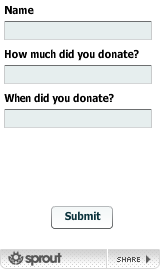
While this approach does take a few steps to get a form onto your iWeb page, it is a free solution that allows you some customization and storage options for the feedback provided by visitors to your website.
What type of Forms will you create for your iWeb site?
If you’ve enjoyed this article, be sure to subscribe to our RSS feed to discover more ways to optimize your iWeb and Mac experience.
No related posts.


April 23, 2008
Thanks!
I will be using it for a sports registration form. To make it a seamless experience, I have used sprout’s ‘go to next page’ for the ‘on submit’ action. I created a second page that has a button with a link to a page on my site that has a ‘pay now’ paypal button. Once it is paid paypal’s exit page goes back to my website’s ‘registration completed’ page. This makes the whole process of registration and payment seem 100% on my site. I also set up Google Docs to send me an email whenever anyone fills out the form.
Thanks again! As this is a non-profit soccer program for ’special needs’ kids it sure is great to be able to do it for free!
April 24, 2008
Jeremy,
I’m glad this has worked out so well for you! Its really great when you can combine a bunch of free applications to get exactly the web site features you were looking for.
Sprout has some real potential in creating dynamic websites. I’m sure you could use it to also show the schedule or records of teams in the sports league.. and updates would be as simple as updating your google docs page.
April 24, 2008
nice post! thanks for sharing this info.
April 29, 2008
Dan;
It worked like magic! Only stumbling block I ran into was tabbing between fields. It won’t do it. What step did I miss?
Thanks,
marek
May 8, 2008
works well but one problem when I make the form and have a drop down list and publish it you can click on them but it wont add the selection to the document
any advice
Craig
May 10, 2008
Craig,
It may be a problem caused by sprout. You could create an iframe of the google doc form page and embed it into iWeb… That may not have the look you’re hoping for but should solve the problem. Let me know if you need help with that task.
May 14, 2008
Hey Dan interesting thing now ! once you edit your form and click on the tab preview and send, the top right theres a embed Button click on it and it gives you the code to copy and paste into iweb !!
May 14, 2008
Craig, thanks for the info. Yes, the embed code on the google docs share form page includes the iframe code to add to your iWeb page.
May 18, 2008
[...] Add Forms to iWeb Pages [...]
May 22, 2008
That is a great solution! The one thing i am having trouble with is that i took the embed code straight from google and put it in iweb and when i submit the form the thank you page has a link to “create your own form” clicking on that bring up my e-mail etc. Is there a way to stop that from appearing on the site?
May 22, 2008
Brian, Can you post a link to your site so we can take a look at it. I imagine it may have to do with a setting in your google docs account.
May 22, 2008
Brian, looks good. Be sure to check that the form is capturing all fields as some have reported that sprout caused some fields to save as blank.
May 22, 2008
Cool! thanks for the great tips! i have bookmarked this site and will be back for sure! I have done several trial submissions and it seems to be keeping up with the info. I have it set to alert me as well as when this goes live it will provide residents with a way to let us know of their vector control issues. Again - great job - i was beating my head against a wall trying to get that into iweb before!
May 22, 2008
I think i will try this for an interactive map as well - the google web widget in iWeb seems to only allow you create one point on the map…i was bummed to find that out!
May 22, 2008
Glad it has worked so well for you. Best of luck with the new site.
May 24, 2008
very cool! Thank you!!
May 28, 2008
“To make it a seamless experience, I have used sprout’s ‘go to next page’ for the ‘on submit’ action. I created a second page that has a button with a link to a page on my site that has a ‘pay now’ paypal button.”
I’m not having the same success as Jeremy when it comes to the submit button on my form. I’ve made the changes in sprout, but when I publish it to my site it doesn’t forward to the next page. Am I missing something? Please help!
May 31, 2008
Noel,
Are you still having the problem? I went to your site and submitted a blank form and it showed the “go to paypal button” and clicking that took me to your Payment options page.
Did you find the problem?
June 2, 2008
Dear Dan,
regarding your calendar tip: I succeeded in creating the holiday calendar, but fail to see the ” iCal button in the address row” of the google calendar (only see the RSS button) ??? any further tips to get this iCal link
June 2, 2008
Peter, The Address Row I referred to is not the browser address bar but a row on the Calendar Settings page that can be accessed by clicking the drop down arrow next to the Holiday Calendar.
June 2, 2008
THX Dan,
Missed that one.
But all works fine now!
Peter
July 13, 2008
Dan,
I am a new Mac user and I have made a wonderful website page using the iweb program, however I have a domain name through Register.com and I am unable to merge my domain name to my iweb page, can you help. Also is there any way to add a paypal button to the iweb page itself. I am so confused, but not a computer novice, this has just become a challenge and I don’t know where to turn.
Thank you,
Carrie
July 13, 2008
Carrie - I sent a response to you via email. Let me know if you have additional questions.