
How To Jailbreak and Restore Your iPhone 4

By Dan Hinckley

29 responses. »

It didn’t take long for the hacker community to identify a way to jailbreak iOS 4 and the iPhone 4. In fact, they’ve made it so easy to do so this time around that you don’t even need to connect your iPhone 4 to your computer to complete the jailbreak process.

Utilizing a security vulnerability in the way that the iOS 4 handles PDF files from applications on the iPhone, the community was able to create access through Safari and a website they’ve build just for this purpose, jailbreakme.com. Starting the jailbreak process is as easy as visiting that site and following the on screen instructions.

An iPhone is jailbroken in order to allow users more control over what their iPhone’s user interface looks like, access to additional applications that Apple hasn’t approved for sale through their App Store, and configuration settings. Many iPhone users maybe interested in jailbreaking their phones in order to add functionality like tethering your iPhone internet connection without having to pay AT&T an additional $20 a month.

Jailbreaking an iPhone is completely legal. In fact, just recently the government specifically called out the ability to jailbreak phones and highlighted that it was exempt from copyright infringement and is legal. While jailbreaking the iphone is legal, it is important to note that Apple will void your iPhone warranty if they can identify that the phone was jailbroken.

Jailbreak Your iPhone 4

Jailbreaking your iPhone 4 is extremely easy. Before your start you’ll want to make sure that you have a backup of your iPhone 4 applications and settings. To do so, plug it in to your Mac or PC and backup the phone by right clicking on it in iTunes and selecting “BackUp”.
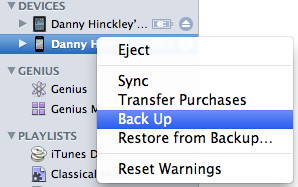
Screen shot 2010-08-02 at 8.51.55 PM.png
  1. Now that your iPhone is backed up, open Safari on your iPhone
  2. Navigate to Jailbreakme.com
  3. Slide the slider to the right to start the process
  4. Let the application run, and when it finishes Cydia will be available to open on your iPhone. Cydia is the application that allows you to install packages, applications and themes not available on the iPhone App Store

After you’ve tested out a jailbroken iPhone and what’s available through Cydia, you maybe interested in restoring your iPhone to its original factory settings.

Restore Your Jailbroken iPhone 4

Restoring your iPhone 4 after jailbreaking it is quick and simple.

  1. Plug your iPhone into your Mac or PC
  2. Open iTunes
  3. Select your iPhone, and click the Restore button on the phone
  4. Screen shot 2010-08-03 at 8.30.41 AM.png
  5. Confirm that you want to restore the phone and start the process
  6. After the factory settings are restored to your phone, continue the process to restore your Apps, Contacts, Music, and Videos

When the process finishes your iPhone 4 will be restored to the exact state that you last backed it up, which is hopefully right before you jailbroke your phone.

If you’ve already jailbroken your iPhone 4, what do you like best about the extra freedom? What apps or features do you wish were available to you through Apple’s App store? Personally, I would love free Tethering.

About Dan Hinckley
Dan Hinckley is an experienced Mac user who converted to Apple products when they introduced them on Intel Processors. He loves helping others get more out of their devices! Subscribe to Maciverse.com to get the latest from Dan and the Maciverse Team!! Find out more about Dan:

29 Responses so far.

  1. Baggyrock

    September 26, 2010 at 10:53 am

    I just purchase a jailbreak and carrier break iPhone 4. The phone and apps all work fine and I did a sync when I first purchased it. When I now connect to iTunes a box comes up telling me that iTunes is unable to connect to my phone and is asking me to restore to original factory settings. Is it safe to do this. I am running 4.0.1 this restore won't upgrade to 4.1?

    Regards. Baggyrock

  2. Dan

    September 26, 2010 at 10:54 am

    restoring may not upgrade to 4.1 but it very likely will remove your jailbreak and carrier break functionality.

  3. Deadalus

    November 13, 2010 at 4:25 am

    Hi there,

    I'm trying to understand this correctly.

    We need SHSH Blobs of our iDevice if we need to downgrade the firmware or if the latest available firmware is newer than what we're having in our device when we need to restore the device to our original firmware. right?

    That means If we are updating the device, we don't need to have the previous SHSH Blobs is it?

    So actually this is a issue only

    a. if you have a device that will loose some unlocking function with updating firmware

    or

    b. if the newest update's jailbreak is still not available and you really need the jailbreak

    So I understand that if you have a FACTORY UNLOCKED iDevice (iPhone 4), This will not be an issue except in a situation where you really need a jailbreak and newest JB is yet to come?

    Please correct me If I'm wrong

    Thanks

    Deadalus

  4. Cecilia

    November 14, 2010 at 9:34 am

    I purchased a jailbreak iphone 4.. but when i restored it the i tunes displayed "There is a problem with your Iphone. We're sorry, the iphone you connected my be damaged or cannot be actvated for service. We reccomend you visit the nearest apple store…and bla..bla..bla.." something like that… is there a way to restore it without going to apple store? Thanksss…

    • Dan

      November 14, 2010 at 1:21 pm

      If you restore a jailbroken iPhone then you are most likely attempting to restore it to its factory settings. You may need specific jailbreak files to restore it and keep it jailbroken.

      • trey

        February 14, 2012 at 1:42 pm

        i have the same problem can you help me?

  5. luke

    January 1, 2011 at 7:11 am

    how do i restore photos/ contacs when all ready on the phone then i accidently sync it to my ipod settings when setting up my new iphone 4

  6. katherine

    February 10, 2011 at 4:11 pm

    If I jailbreak my iPhone 4 and find that I do not like it, or something has gone wrong can I restore my iPhone and it won't have any problems?

    kittykatscouser@gmail.com

  7. Green

    February 15, 2011 at 2:31 pm

    http://www.redmondpie.com/download-greenpois0n-rc

  8. dailyrade

    April 22, 2011 at 2:55 am

    My boyfriend has a jailbroken phone, but accidentally updated the software. When he tries to restore his phone from iTunes, it gives him an error (1013, from memory I think) He's got Cydia jailbreak. Any ideas on a fix that doesn't require a trip to the Apple store?

  9. Gerry

    May 24, 2011 at 6:31 pm

    Verizon iPhone 4 DEAD after attempting Jailbreak iOS 4.2.8 Using PwnageTool on my Mac

    Please Help!

    I had originally jailbroke my Verizon iPhone 4 with IOS 4.2.6 successfully using Greenpois0n and had no problems. I then began having problems with the WiFi working really slowly and stopping (especially while streaming).

    I first downloaded & restored it with the 4.2.8 update (didn't fix the WiFi problem). Then, after a little research, I re-registered it as a new phone (so far, so good… it seemed to fix the WiFi.)

    continued…

  10. Gerry

    May 24, 2011 at 6:32 pm

    I then followed the directions on a YouTube video exactly (I can't remember the name of the video- I'm at work & can't get YouTube) using PwnageTool and the iOS 4.2.8 bundle on my Mac. After getting to the part where; I have my custom iOS 4.2.8 firmware, start iTunes and click Option+restore, browse for the custom firmware, select it, and wait for my iPhone 4 to be restored to this firmware; I get a message that an unknown error occured and the phone can't be restored. I then tried to restore it normally without the jailbreak and get the same message.

    Now all I have listed in iTunes is about 110 apps (out of over 600 – over 11 GB!). Is there anyway to fix this or at least, get the info & firmware back… I'm DESPERATE!

    • Dan

      May 24, 2011 at 7:00 pm

      Try a Hardware Reset.. Turn off your iPhone.. Hold down both power and home buttons and plugin the iPhone to your computer. Wait for iTunes to detect that you're performing a DFU reset and restore the phone to factory settings.

      Restore from a backup.

      • kalum

        March 20, 2012 at 12:46 am

        Hi
        I try to update IOS 5.1 with jailbroken iphone 4g. I got error massage 21 and can not restore. Could you pls help me. kalum_2011@yahoo.com

  11. smenyurka@yahoo.com

    June 16, 2011 at 8:25 pm

    after jailbroked my new att iphone 4 safari does not work and Cydia either, what should I do???? I have the 4.3 software

  12. noe hernandez

    June 23, 2011 at 2:18 pm

    Please help, I could not up date my jailbreaked iphone 4 so I restore it, but it does not start again, wtha can I do?

  13. Livia

    January 23, 2012 at 12:55 am

    Hi there, please can someone help me? I Jailbroke my phone last night via redmondpie via command prompt but accidentally left out the 10th step. I managed to load a new theme via Cydia and Winterboard but felt because I had left out the 10th step I must probably redo it. So I uninstalled Cydia and deleted the Cydia icon. Then I went to Itunes and did a restore. The phone started up but will not connect to Itunes. It gives me an error: "This Iphone might be damaged and unable to activate for service, contact your nearest Apple store" I tried the Power button and Home button thingie again but nothing. It did however state at some point that the phone is in rocovery mode and needs to be restored. I can power up the phone but then it goes to configuration, you select your language, country etc but as soon as you want to select a cellular network it gives me the "damaged phone" message. Please tell me what I can do as now can't use my Iphone. This is an Iphone 4S with the latest operating system. I am from South-Africa. Thanks, Livia :0 )

  14. sridhar

    June 3, 2012 at 8:59 pm

    i have a jailbroken iPhone. will my phone have any problem after restoring it back to normal?

  15. Merete

    June 4, 2012 at 8:54 am

    Hi. My son has jailbreak his iPhone 4 , and no the iPhone has been dektiv and not possible to open. What can we do ? Some said tatt we have to restart the iPhone to the original ?But how ?

    Mvh Merete

  16. Brakken

    June 17, 2012 at 7:45 pm

    Option 1: Let it all go and buy a new (Android) phone
    Option 2: Be a hacker and go through the jailbreaking process
    Option 3: Return to normality and keep trying iTunes Restore (took four tries and 10 hours, but it eventually worked)

    Advice: Never update an idevice once it's been jailbroken.

  17. omkar

    June 19, 2012 at 7:14 am

    how to get si on my iphone 4 with 5.1.1

  18. jessica

    June 25, 2012 at 12:45 am

    ok if your phone is jail broken and unlocked the easiest way to stay that way is not to use iTunes thru a computer and do everything thru the iphone itself.

    without it being synced to a computer it will not be able to take jailbreakunlock feature out.Hope everyone understands this.

  19. jack

    June 30, 2012 at 7:21 am

    after jailbreaking with abtisinthe 2.0.4 my iphone 4s (5.1.1) the Itunes on my windsows pc can't restore it, i get error. could you help me how erase cydia and restore my iphone?

  20. iphone unlock

    July 6, 2012 at 9:58 am

    Heya i am for the first time here. I found this board and I find
    It truly useful & it helped me out much. I hope to
    give something back and aid others like you aided me.

  21. natalia

    August 14, 2012 at 10:16 am

    i restored my jailbroken phone but now it has refused to fully boot. it's asking for d original sim which i dont have. what do i do pls?

  22. alba

    November 8, 2012 at 5:19 pm

    I jail broke my phone and now i want to retore it. Itunes wont let me retore it without updating it first but i cant update it because its been jailbroken. How do i get around this?

  23. ipad 3 2012 review

    December 17, 2012 at 2:52 am

    Hi i am kavin, its my first occasion to commenting anyplace, when i read this article

    i thought i could also make comment due to this sensible article.

  24. Kim

    January 29, 2013 at 1:39 pm

    Hi I recently bought an iphone 4 that has already been jailbroken with cydia. I accidently went to update the software and the phone is now stuck on the screen "connect to itunes" however when I do this it says "the iphone "iphone" could not be restored. An unknown error occured (3194)" please help!

  25. James

    April 9, 2013 at 11:46 pm

    Such a great yet interesting post. Thank you very much for sharing this helpful stuff.

Leave a Reply

Site powered by Go Fish Digital