
Update: Follow these steps to import gmail contacts to your iPhone directly.
I know that one of the frustrating things about switching from one computer to another is the process of moving things like your address book may gets lost in the shuffle. Moving From a PC to a Mac
QUICK AND EASY EXPORT
While in the past there have been a number of methods to get your Gmail contacts into your Mac Address Book, most required a third party application and for some reason something always complicated the process. Thanks to the ever increasing friendship between Apple and Google it seems that with the latest updates to Gmail, exporting contacts in to an Address Book Format is quick and easy.
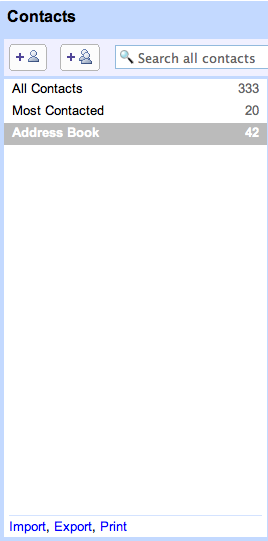
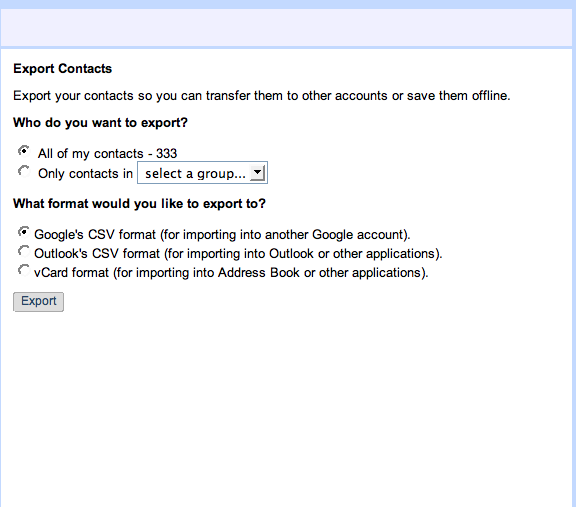
After logging into a Gmail account navigate to your contact list. From there you can export all your contacts or create a contact group that includes the addresses you want included into your Address Book on your Mac. After creating a group simply click export and then select the group from the export drop down menu. Be sure to pick vCard format as the export format and save the download to your desktop.
IMPORT IN TWO EASY CLICKS
Open Address Book and select File >> Import >> vCards. Select the downloaded .vcf file and confirm the import and your Gmail/Google contacts will now be included in your Address Book and accessible from all your other Mac Applications. You can repeat the process if you update your Gmail contacts often. Address Book will only import the new contacts and/or update edited information.
The shared contact list and the new IMAP feature of Gmail makes it a great tool to use with Mail on your computer and on your iPod/iPhone.
Read this to Import Address Book Contacts to Gmail.
Get more tips like this by subscribing to Maciverse.com Its free!
