
Taking pictures nowadays is a very fun hobby for so many people, especially now that a lot of phones and computers have built in cameras. Apple makes it easy to view and edit photos with iPhoto but they also allow you to take fun and quick pictures with the Photo Booth application included with every Mac.
While the pictures can be interesting themselves, it is in the nature of man to get bored easily, so Apple has included photo booth effects to help keep us entertained.
- Standard Effects: Apple includes a number effects with Photo Booth that lets you quickly and easily modify the images taken by the software. They are quick and easy to use and very entertaining.
Additional custom effects are available to add to photo booth.
- Cat eye: This photo booth effects add-on has 40 effects divided into 5 groups. The first group is called Retro Pixel and it is themed in the 20th century. This is great for those who are fond of experimenting because of the black and white and rainbow inspired outcome that comes from the 60’s and 70’s. The second group of feature is called The Love for the 80’s, which makes your picture looks like it is in the 1980’s. The third group of effects is the Boobtube, which provides a set of TV screen effects; the fourth called FewTile that has the picture in a tiled-effect; and the last called Bent Pole that has an optical image distortion effect with a twist. All three offer crazy shapes that alter your picture.
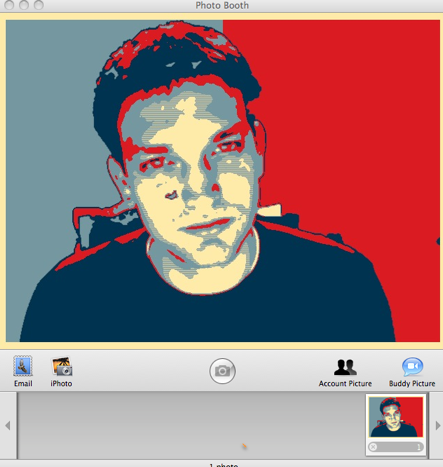
- Obamafy: Is a popular Effect that mimics the picture poster of President Barack Obama and caused a lot of intrigues. It makes your background blue and the red color makes you position yourself so you can have the same outcome. You can adjust the brightness as well by dragging the mouth through and fro. Don’t get too excited, as Obamafy may not work on Snow Leopard’s Photo Booth unless you’re running Photo Booth in 32bit mode.
- Freak show: Includes 16 effects that makes you feel like a freak yourself. This feature is not to scare you but to simply have fun and play around with. It allows you to stretch, magnify, or swirl your pictures. This will fool your friends into thinking that something is wrong with their eyesight because it also has that hologram effect.
You can find more photo effects online. If you want to do away with effects that you do not like, just remove them from their respective folders (~/library/Compositions/). Photo booth might crash if you apply features all at once. So it is better if you apply one photo effect at a time. Now, it’s time to use all those new Photo Booth effects! Smile!
