
Subscribe by email
Follow us on Twitter Subscribe to our RSS Feed

Add your Facebook Friends Phone numbers to Address Book

by Dan Print This Post
Share this on Facebook Share this on Digg Share this on Twitter Share this on StumbleUpon Comments 37 Comments »
If you enjoy this article and other information provided here at Maciverse.com, be sure to keep up with the latest Mac hints, tips, and more by following us on twitter @Maciverse or by subscribing to our feed.

Update: Facebook released an update to their iPhone App that makes it quick and easy to sync your Facebook Friends with your iPhone Address Book Contacts. If you have an iPhone, this is a great way to import your Facebook Information to Address Book on your Mac.

When Apple announced the iPhone the importance of the Address Book application increased significantly. Address Book was now not only the tool to keep the various contact details about your friends, family, and work colleagues but was now the way you managed your phonebook on your iPhone.

Over the past few years Facebook.com has emerged as a great way to keep in touch with your friends and family. One of the optional fields in Facebook that your friends can make available to you is their phone number. Now, you can import your Facebook Friends phone numbers to Address Book.

Firefox & Greasemonkey

The first thing you need to be able to import your Facebook phone numbers to Address Book is the Firefox Web browser and a plugin called Greasemonkey.

Head over to the Firefox website and download the web browser if you don’t already have it installed on your computer.

Firefox web browser | Faster, more secure, & customizable.png

After you’ve installed Firefox you need to install the Greasemonkey plugin. This plugin will allow you to utilize a free application to gather all the Facebook phone numbers from our account.

Navigate to the Greasemonkey plugin page and click the add to firefox button.

Greasemonkey __ Firefox Add-ons.png

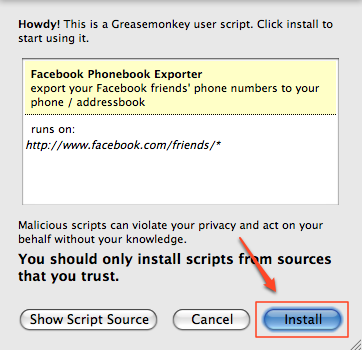
After Greasemonkey is installed the application will ask to restart Firefox. Restart the browser and navigate to the Greasemonkey script page that you will utilize to get your Facebook friends phone numbers and import them into Address Book. Click install to add the script to your Greasemonkey collection.
Firefox.png

Getting Your Facebook Friends Phone Numbers

Now that you’ve added Firefox, Greasemonkey, and the Greasemonkey script to get Facebook phone numbers, head over to http://www.facebook.com/friends/. Login to Facebook if you’re not already logged in and click on the Phonebook button.

Facebook | All Friends.png

Once the page has loaded, in Firefox click Tools >> Greasemonkey >> User Scrip Commands… >> Export Facebook Phonebook.

Spotlight.png

The application that will export the data may require you to login with a Google Account but will then transfer you to a page where it will allow you export your friend’s phone numbers into Address Book.

Adding to Address Book

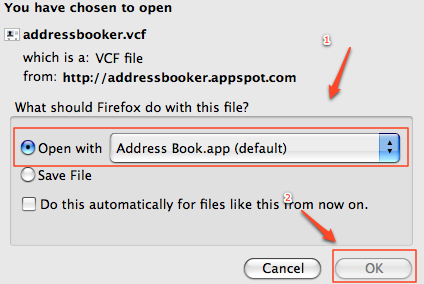
Once you’ve ran the Greasemonkey script to export FacebookpPhone numbers and have found yourself on the AddressBooker menu, select Export as vCard. In the popup window that appears, select Open with Address Book and then press Ok.
Opening addressbooker.vcf.png

Address Book should then launch and ask you to confirm that you’d like add the contacts to Address book. Allow Address book to import the new new vCard details and then merge the contact details on any overlapping imported contacts.

Once sync’d, Address Book on your desktop and iPhone will now contain the name and phone numbers of your friends who have shared their number on Facebook.

For additional details on the script and application used to export the phonebook details from Facebook visit Brad’s Life (the creator of the script and application).

NOTE: latest version of the script is working for some people. Others are still receiving errors.

Stay fashionable, go wireless with a Plantronics Voyager 510 Bluetooth Headset for your iPhone.

Related posts:

  1. Sync Your Facebook Friends With iPhone Contacts
  2. Add Facebook Chat to iChat
  3. iPhoto Book
  4. How to back up your iPhone contacts

Comments

  1. when i come to tools/ greasemonkey/, the user scripts command doesn’t funtion, and i’ve downloaded all the necessary things, so what now?

  2. Or you can skip all of the above steps and use an application called AddressBookSync that will pull all of the users info from Facebook and put it into iCal and Address Book. It seems simpler in my opinion and I don’t have to use Firefox. I’m a Safari user.

  3. Brent – AddressBookSync DOES NOT sync phone numbers or email addresses from Facebook. It is good for adding photos to your address book contacts.

  4. Tnx. It doesn’t work for me. When I run script it says

    Couldn’t find text: ['n' with phone numbers]

  5. stojan – were you sure to select the phone numbers tab?

    Also, were any names listed when you did so?

  6. This is great, thanks for the tip. It worked great for me.

  7. Required element ‘summary’ not found; aborting.

    that comes up when i try to export the phonebook.

  8. I have the same problem. Any solutions?

    /Joe

  9. Wanda & Joe, are you both using english? It looks like this only supports english facebook pages so that may be a problem.

    Head over to Brad’s Life: http://brad.livejournal.com/2398409.html if you’re still having trouble. He developed the site and may know more about the problem.

  10. emm… thanks :)

  11. i think people may be having these problems because of the new facebook friends and phonebook pages…

  12. Yeah, that started happening when they redesigned that page….again.

  13. The developer has posted an update to the script that some people are reporting as working. Others are getting a new error. He is working on updates so keep checking back to see if the latest script is working with the newest page.

  14. Worked like a charm. Thank you.

  15. well.. it’s like I said!
    Mine: tube

  16. No dice, won’t allow me to execute the script on the phonebook page.

  17. [...] 1. Facebook Phonebook Exporter Greasemonkey script: This script will export phone numbers from Facebook friend lists.  WARNING: This script currently uses a remote service to parse and return VCF files.  So unless you plan to host the web app portion on your own server (code available on github), you will be sending some potentially private information to a remote server.  Instructions on how to use this script are also available. [...]

  18. What does it mean when I get this page: http://addressbooker.appspot.com/submit

    “403 Over Quota

    This application is temporarily over its quota”

  19. The instructions worked for me successfully.

    Is there a way to do this same procedure with emails? Please say yes!

  20. I get this error:

    Error: uncaught exception: [Exception... "Component returned failure code: 0x80004005 (NS_ERROR_FAILURE) [nsIDOMHTMLFormElement.submit]” nsresult: “0×80004005 (NS_ERROR_FAILURE)” location: “JS frame :: file:///Users/mushfeqkhan/Library/Application%20Support/Firefox/Profiles/001eng6s.default/extensions/%7Be4a8a97b-f2ed-450b-b12d-ee082ba24781%7D/components/greasemonkey.js :: anonymous :: line 368″ data: no]

    Can anyone help? :(

  21. Not exactly sure what the problem is, but it looks like you may be having trouble with greasemonkey. Try re-installing it?

  22. This won’t sync e-mail adresses right? Only phone numbers?

  23. cookie byrd

  24. Works flawless :) thanks
    Only thing is in google contacts it doesn’t import the pics… But that’s not the end of the world! works GREAT!

  25. Im at the friends page but when I go to select “user script commands”, the button is not engaged so i cant click on it… any tips besides using another application ?

  26. Try the new Facebook iPhone app. We’ve covered it in another article.

  27. Fantastic post Dan, thanks a lot.

    As others reported, a bit of trouble getting the GM script to run now that Facebook have changed their URLs around, but easily fixed by adding facebook.com/*friends* to the run list in GM’s preferences.

    I use AddressBookSync as well, as mentioned by Brent, but having a quick and easy way to get mobile numbers in is really useful.

    Now if only people would stop posting stupid numbers on Facebook -.-

  28. Hey, this program still works! When you’re on the Phonebook page, go to “Tools>Greasemonkey>Manage User Scripts” add “http://www.facebook.com/home.php?#!/friends/?filter=pfp” to the list of “Included Pages” for the application. Refresh the webpage and then run the applet.

  29. Thanks Anselm – That’s the ticket, I was getting the error messages until I followed your instructions! That’s awesome, worked great for me (using firefox plug-in)

  30. using the Firefox plug-in, I’m getting the error: “Didn’t find phonebook right for: null”. Any suggestions?

  31. I had the same problem as the above poster today.

  32. Same as above.

  33. Facebook must have a new layout. I suggest trying to sync through the iPhone if you have one. That way will work for sure.

  34. Dan, thank you.

    I am getting the null message too.

    what is the process for doing as you say and “trying to sync through the iPhone”.

    thanks very much for your help – looks super useful if i can get it to work.

    [i have an iphone 3gs on OS4. running firefox latest version on win7 home premium, 64 bit].

  35. actually, i sorted it. there is a new script on set 5

  36. how did you fix the ‘null’ error message? pretty please with cheese on top

  37. Please how to fix it now? I’m desperate.